
How Much Time Do You Waste Searching for Files Every Day?

The Hidden Time Sink in Your Workday
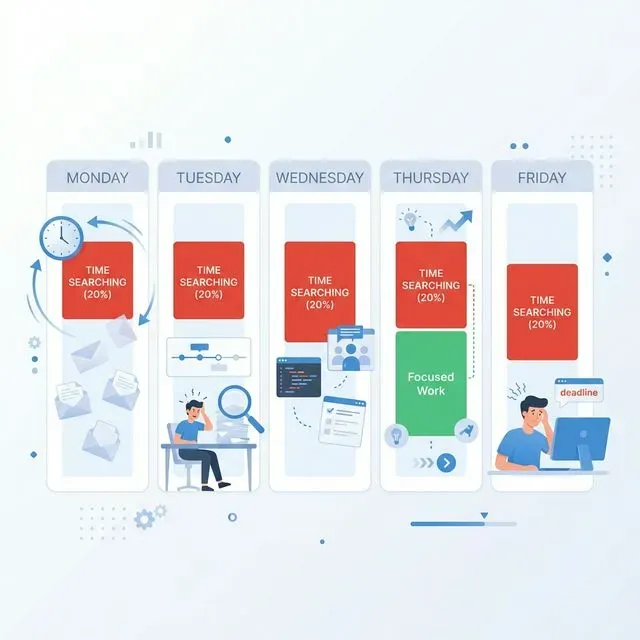
Section titled “The Hidden Time Sink in Your Workday”Here is a number that should stop you in your tracks. McKinsey found that knowledge workers spend an average of 1.8 hours every single day searching for information. That is nine and a half hours each week. Nearly 20 percent of your entire work week disappears into the black hole of file hunting.
Think about that for a moment. If you work a standard 40-hour week, one full day out of every five is spent not creating, not analyzing, not collaborating, but simply trying to find things you know exist somewhere. It is the equivalent of working Monday through Thursday, then spending all of Friday just searching for your work from the previous four days.
The frustrating part is that this happens in tiny increments. A few minutes here, ten minutes there. It never feels like a big deal in the moment. But those minutes accumulate into hours, and those hours accumulate into days. By the end of the year, you will have spent nearly 500 hours just looking for files.
And this is not a problem unique to disorganized people. Even the most meticulous file organizers struggle because the system itself is broken. We generate more files than ever before. We store them in more places than ever before. And the tools we rely on to find them have not kept pace with how we actually work.
Nobody tracks this time. There is no line item on your timesheet for “searching for the Q3 report.” There is no meeting to discuss how much productivity your team loses to file hunting. It is a silent tax on your day, invisible in every metric except the one that matters most: how much meaningful work you actually got done.
The irony is that we live in the golden age of information. We can find anything on the internet in milliseconds. We can ask a voice assistant to play any song ever recorded. But finding a file on our own computer, a file we created and saved ourselves, remains an exercise in frustration. Something is fundamentally wrong with that picture.
Where All That Time Actually Goes
Section titled “Where All That Time Actually Goes”If you have ever tried to find a specific file, you know it is rarely a simple process. It is not a matter of typing a name and instantly seeing what you need. Real file searches are messy, circuitous journeys that involve multiple attempts and plenty of dead ends.
Navigating Folder Hierarchies
Section titled “Navigating Folder Hierarchies”The first time drain is navigating folder hierarchies. Someone created a logical folder structure years ago, but that logic may not match how you think about the file you need. Was the quarterly report filed under Finance, under Q3, under 2023, or under the project name? Each guess requires drilling down through layers of folders, realizing it is not there, backing out, and trying another path. A search that should take seconds stretches into five or ten minutes of clicking and scrolling.
And folder structures change over time. A colleague reorganized the shared drive last year. Your company migrated from one cloud platform to another. The folder that used to hold all your reports was renamed, moved, or split into three different subfolders. You are navigating a maze that keeps rearranging itself.
The Failed Search Loop
Section titled “The Failed Search Loop”Then there is the search itself. You type what you think the file is called into the search box. Nothing comes up. You try a different keyword. Still nothing. Maybe it was called something slightly different. Maybe the person who created it used abbreviations you do not recognize. Maybe the file name is just Document_Final_Final_ACTUAL_Final.docx. Each failed attempt adds another minute or two, and the frustration builds with every empty result screen.
The worst part about failed searches is the uncertainty. When you get no results, you do not know if the file does not exist, or if you are just using the wrong search terms. So you keep trying, substituting words, adding quotation marks, toggling between “file name” and “everything.” It is a guessing game where you do not know the rules.
Opening Files One by One
Section titled “Opening Files One by One”Even when search does return results, you are not done. You have to open files one by one to check if they are the right version. Is this the draft or the final? Did this one include the revisions from last week? Opening, scanning, closing, repeat. It is tedious work that feels beneath your actual job responsibilities, yet here you are doing it for the third time today.
When you are looking at spreadsheets, this is even worse. The file name might be identical across three versions, and you have to open each one and scroll through the data to figure out which one has the updated numbers. For large files, this means waiting for them to load, which adds even more dead time to each check.
The Meeting Tax
Section titled “The Meeting Tax”There is another time drain that rarely gets discussed: the time lost during meetings because someone cannot find the file they were supposed to present. You have seen it happen. A colleague shares their screen, fumbles through folders, apologizes, types something into a search bar, waits, tries again. The entire meeting pauses while one person hunts for a document. Multiply that by every meeting in your week and you start to see how file searching does not just consume your own time. It steals time from everyone around you.
Sometimes the file never gets found during the meeting at all. Someone promises to send it later. Another item for the to-do list, another thread to follow up on, another piece of information delayed because the retrieval system failed.
The Social and Emotional Costs
Section titled “The Social and Emotional Costs”When individual searching fails, we turn to our colleagues. You send a message asking if anyone has the file. Then you wait. Maybe they respond quickly with the exact file you need. More often, they are busy with their own work and respond hours later, or they also cannot find it and now you have two people searching. Sometimes they send you a version, but it is not the one you needed, so the cycle continues.
This social cost extends beyond the time spent. There is an unspoken embarrassment in admitting you cannot find something. You feel like you should know where your files are, like it is a personal failing rather than a systemic problem. So sometimes you waste even more time searching on your own before finally asking for help, just to avoid looking disorganized.
The most painful scenario is when you simply cannot find the file and have to recreate it from scratch. You spend an hour reconstructing a report you are certain exists somewhere, burning time on work you already did once. It is demoralizing in a way that is hard to describe until you have experienced it. The frustration lingers long after you finish the task.
The App-Switching Marathon
Section titled “The App-Switching Marathon”And then there is the app switching. The file might be in your local documents. Or it could be in Google Drive. Or OneDrive. Or SharePoint. Or attached to an email. Or saved in that project management tool. To be thorough, you have to search each location separately, logging in, waiting for interfaces to load, running the same query across multiple systems. It is exhausting just thinking about it.
Each switch carries a cognitive cost. You have to remember where you already searched, which keywords you tried in each system, and whether the results you saw five minutes ago in a different app might actually be the right file after all. Your working memory fills up with search logistics instead of the actual work you were trying to do.
The Scale of the Problem
Section titled “The Scale of the Problem”It is worth stepping back and looking at this from a wider perspective. You are not the only one dealing with this. In an average organization, every single knowledge worker loses those 1.8 hours daily. An office of 50 people loses 90 hours of collective productivity every single day to file searching. That is the equivalent of more than eleven people working full-time just to look for things.
The problem gets worse as organizations grow. More people create more files. More files end up in more locations. The shared drives that were organized three years ago have become a sprawl of folders that nobody maintains. The naming conventions that someone established have been forgotten or ignored. Every new employee adds their own organizational logic on top of the existing chaos.
Even when organizations invest in document management systems, the problem often shifts rather than disappears. Now you have yet another place to search, with its own interface and its own quirks, layered on top of all the locations that already existed. The intent was to centralize, but the result is one more silo in an already fragmented landscape.
For freelancers and small business owners, the burden is just as heavy but more personal. There is no IT department to set up file management systems. There is no admin to help locate lost documents. You are the IT department, the filing clerk, and the worker, all at once. Every minute spent searching is a minute not spent on billable work.
The Invisible Costs Beyond the Clock
Section titled “The Invisible Costs Beyond the Clock”The time loss is bad enough, but the hidden costs cut even deeper. Every search interrupts your focus. You were in the middle of writing a proposal, fully immersed in the flow of ideas, and then you needed to find a reference document. Twenty minutes later, you have the file, but your mental momentum is gone. Getting back into that flow state takes additional time, if you can even recapture it at all.
Research on context switching suggests it takes an average of 23 minutes to regain deep focus after an interruption. So a five-minute search does not actually cost five minutes. It costs five minutes of searching plus 23 minutes of re-engagement. That single search just ate nearly half an hour of productive work.
And these interruptions are not optional. You cannot ignore the need for a file. When someone asks for a document in a meeting, you have to find it. When a deadline requires a reference from a previous project, you have to locate it. Every search is compulsory, which makes the disruption to your focus state unavoidable.
The frustration compounds throughout the day. One difficult search in the morning puts you in a bad mood. Another after lunch raises your stress level. By mid-afternoon, you are annoyed before you even start searching because you know what is coming. This emotional toll affects your work quality and your interactions with colleagues. You snap at someone in a meeting, and the real reason is that you spent twenty minutes looking for a file this morning.
There is also the defensive behavior that emerges. When you do find a file you might need again, you download it “just in case.” Then you save a copy to your desktop. Then another in your documents folder. Soon you have five versions of the same file scattered across your system, which makes future searches even harder because now there are multiple files with similar names in different locations. The coping mechanism makes the original problem worse.
Over time, this creates a vicious cycle. Bad search leads to hoarding. Hoarding leads to clutter. Clutter makes search even worse. And the cycle continues until your desktop is covered in files and every folder feels like a landfill.
The Perfectionism Trap
Section titled “The Perfectionism Trap”Some people respond to the search problem by investing enormous effort into organization. They create elaborate folder hierarchies, color-coded labels, and detailed naming conventions. They spend their Sunday afternoons tidying their digital files the way others tidy their closets.
This approach can work, but it has a hidden cost: maintenance. Every new file requires a decision about where to put it. Every project requires new folders. Every collaboration introduces files that do not fit the existing structure. The overhead of maintaining a perfect system often rivals the time you would have spent searching in a less organized one.
The fundamental issue is that organization is a system that degrades without constant attention, while search is a system that scales without effort. The more files you have, the harder it is to keep them organized, but a good search tool handles ten thousand files as easily as ten.
Why Built-In Search Does Not Save You
Section titled “Why Built-In Search Does Not Save You”Most operating systems come with search tools. Spotlight on Mac, Windows Search on PC. They seem like they should solve this problem, but they rarely do.
The first issue is reliability. These tools are inconsistent at best. Sometimes they find what you are looking for instantly. Other times they miss files that are sitting right there in your documents folder. You never know whether to trust the results, so you end up manually browsing anyway, just to be safe. That double-checking behavior wipes out any time savings the search tool was supposed to provide.
The indexing process itself causes problems. Spotlight might decide to rebuild its index at the worst possible moment, slowing your machine to a crawl while simultaneously returning incomplete results. Windows Search’s indexer sometimes falls behind, so files you saved yesterday do not appear in search until tomorrow. You learn to distrust the tools, which means you use them less, which means you browse manually more, which means you waste more time.
There is a deeper issue at play. Built-in search tools were designed for a simpler era when all your files lived on one drive in one folder hierarchy. They were never architected to handle the sprawling, multi-location, multi-format reality of how we work today. Asking Spotlight to search your Google Drive is like asking a library catalog to search a different library. The tool simply was not built for that job.
Then there is the cloud problem. Your local search cannot see into your Google Drive. It cannot peek inside OneDrive unless you have specifically synced those folders. SharePoint is essentially invisible. Each cloud service is its own silo with its own search, and none of them talk to each other. The result is a fragmented searching experience that requires you to be the connector between systems.
Even within a single cloud service, search is limited. You can search file names, sometimes, if the service indexed them properly. But searching the actual content of documents? Finding a contract by searching for a specific clause inside it? That is beyond what most built-in tools can handle. You are back to opening files one by one, except now you are doing it in a web interface that takes twice as long to load.
The Search Tool That Actually Saves Time
Section titled “The Search Tool That Actually Saves Time”There is a better way. It starts with accepting that your files will always be scattered across multiple locations, and that is okay. What matters is having one place where you can search all of them at once.
 This is what Tamsaek was built for. Instead of jumping between Spotlight, Finder, Google Drive search, and OneDrive, you have a single search bar that sees everything. Local files, cloud storage, external drives, all indexed and searchable from one interface.
The difference is not just convenience, it is capability. Tamsaek searches inside files, not just file names. When you search for “the budget from March,” it finds the spreadsheet even if the file name is just numbers.xlsx. When you search for “the contract with the clause about termination,” it finds the PDF without you needing to remember what the file was called or where it was saved.
You can search in plain language, the way you actually think about your files. “The presentation from last Tuesday.” “That email attachment from Sarah about the Q3 review.” Tamsaek understands context and finds what you mean, not just what you typed.
Results in Tamsaek appear in seconds, not minutes. You type, you see results, you click the file you need. No more drilling through folders. No more opening multiple files to check contents. No more wondering if you searched the right location. The entire search-browse-open-check-close cycle is replaced by a single step: type what you need and click the result.
Tamsaek runs entirely locally on your computer. Your files and search queries never leave your machine. There is no cloud service watching what you search for or analyzing your files. Your data stays private, which matters especially if you work with sensitive documents.
Doing the Math on Reclaimed Time
Section titled “Doing the Math on Reclaimed Time”Let us be conservative and say Tamsaek saves you just 30 minutes per day. That is 2.5 hours per week. Over the course of a year, that adds up to 130 hours.
What could you do with an extra 130 hours Tamsaek gives back to you? That is more than three full work weeks. You could finish that project that keeps getting pushed back. You could finally organize your inbox. You could leave work on time every day and spend that time with family, or on hobbies, or just resting.
For teams, the math is even more compelling. Ten people each saving 30 minutes per day equals 1,300 hours per year. That is roughly the equivalent of a full-time employee’s annual output, recovered from time that was previously wasted on file hunting.
The Compound Effect
Section titled “The Compound Effect”The savings compound in ways that are not immediately obvious. When you can find files quickly, you stop hoarding duplicates. When you stop hoarding, your storage becomes cleaner. When your storage is cleaner, searches are faster. The positive cycle replaces the vicious one.
You also start trusting your system. Instead of anxiously downloading copies of every important file, you save things once, in the right place, and move on. That confidence changes the way you work. You spend less mental energy worrying about whether you will be able to find something later and more energy on the work itself.
Beyond Individual Productivity
Section titled “Beyond Individual Productivity”The ripple effects of using Tamsaek extend beyond your own desk. When your team knows that files can be found quickly, the entire workflow changes. Fewer emails asking “where is that file?” Fewer meeting delays. Fewer duplicated efforts where two people recreate the same document because neither could find the original.
The time you save is not just about efficiency metrics or productivity scores. It is about removing a constant source of friction from your daily life. It is about ending the day feeling accomplished rather than drained. It is about never having to recreate a file you know exists somewhere.
That 1.8 hours per day is not a fixed cost of working with files. It is a choice we have accepted because the alternatives seemed too complicated or too limited. But they do not have to be. The right tool turns file searching from a daily struggle into a simple, solved problem.